Monday, June 28, 2010

Saturday, June 26, 2010

Uruguay vs Corea del Sur Street Celebration

After smashing South Korea, Uruguay was able to enter the World Cup semi-finals leading to a country wide celebration, starting in the streets of Montevideo.

It has been several world cups since Uruguay has entered the semi finals so that made it more enjoyable for the Uruguayans.

Being the only Asian walking along the street parade, I was always asked if I was Korean and telling them 'no' was not enough for them to take a group picture with me. I feel like a celebrity until of course I see a facebook picture of me and a group of people with a caption of "Mejor suerte la próxima vez, coreano dude asiático".


IMG_5287 IMG_5288IMG_5305IMG_5312 IMG_5316IMG_5314 IMG_5300IMG_5290 IMG_5282

Wednesday, June 23, 2010

you intelligent virus you!


I was just uploading some photos over the internetz when all of a sudden, a former office-mate of mine, who I don't usually chat with, buzzed me over YM. 

After a few seconds, I realized that this was a cleverly created (in other words, malicious) script that would send a reply whenever you replied back. I really find it ingenious! Kudos to the creator! 

As for you my friend.... stop doing porn!!!

Tuesday, June 01, 2010

Embajada de Filipinas en Buenos Aires

Good thing I thought I would need an NBI clearance to go to Uruguay or else I would have missed going to the Philippine embassy in Buenos Aires. 
The Filipinos I've meet in the embassy were very nice and hospitable and wouldn't have expected anything less! :)

IMG_4848 IMG_4830IMG_4850IMG_4826 IMG_4833IMG_4822 IMG_4831IMG_4828 IMG_4840

Sunday, May 30, 2010

TUTORIAL: Adding your name to the Exif Data (Canon System)

Exif SampleReally want to personalize your camera and each and every photo you take?
Then customize your Exif Data!

For simplicities sake, an Exif data is the properties embedded in the photo.
E.g Camera settings, file size, etc. (As seen on the photo on the left)

The goal of this tutorial is to automatically tag your photos with your name and/or
alias whichever you prefer. (See photo on the left with yellow highlight)

Note: This tutorial only works for Canon systems.


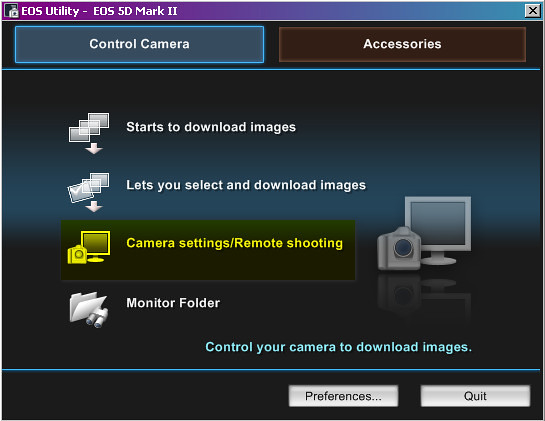
Step 1: Go to EOS Utility
- This is an application that is included in your camera CD installer.

Step 2: Click Camera settings/Remote Shooting


Camera Settings


Step 3: Go to Set-up menu.
-Change the following:
        - Owner's Name
        - Author
        - Copyright.

Step 4 and Final step: Shoot it out and have some fun!

Wednesday, May 26, 2010

Basilica de Lujan

on to the church

Leaving for Montevideo in a few weeks, I had to explore somewhere outside of the Buenos Aires Capital! Good thing my friend Ricardo is willing to be my tour guide for the day so onward to the neo-gothic Basilica de Lujan! \:D/ 

Friday, May 21, 2010

French lunch @ Petanque

Ate lunch at some french place in San Telmo Buenos Aires. Food was good but the serving was too small for my taste. =P